Repository navigation
CEPH Primary Storage capacity calculate #5500
Description
Activity
I assume you are using a single replica pool and an rbd pool for the rbd images. What about if someone has multiple pools on his/her Ceph cluster eg. erasure coding pools and replica pools. How would Cloudstack know which pool to choose for the calculation?
Use
ceph dfthat is no need to know erasure coding pools or replica.
https://docs.ceph.com/en/latest/rados/operations/monitoring/#checking-a-cluster-s-usage-stats# ceph df --- RAW STORAGE --- CLASS SIZE AVAIL USED RAW USED %RAW USED hdd 29 TiB 21 TiB 8.2 TiB 8.2 TiB 28.21 TOTAL 29 TiB 21 TiB 8.2 TiB 8.2 TiB 28.21 --- POOLS --- POOL ID PGS STORED OBJECTS USED %USED MAX AVAIL device_health_metrics 1 1 0 B 0 0 B 0 5.8 TiB cloudstack 2 256 2.7 TiB 724.29k 8.2 TiB 31.88 5.8 TiBIn the POOLS section are not inclusive of the number of replicas, snapshots or clones.
STORED : actual amount of data has stored.
MAX AVAIL : estimated amount of data that can be written.Used = STORED Actual Total = STORED + MAX AVAIL Allocated: Disk Allocated Total = (STORED + MAX AVAIL) * Overprovisioning FactorHi @leolleeooleo I'm using Ceph v16 (pacific) with ACS 4.16.0.0 and not able to reproduce this, however, I update the max pool capacity after adding it: (in this example, max. allocatable capacity of ceph cluster/pool set to 200GB; the ceph pool has 3xreplica)
> update storagepool capacitybytes=214748364800 id=<pool-id>
{
  "storagepool": {
    "created": "2021-12-22T12:22:54+0000",
    "disksizeallocated": 109735575552,
    "disksizetotal": 214748364800,
    "disksizeused": 65567482252,
    "hasannotations": false,
    "hypervisor": "KVM",
    "id": "--redacted--",
    "ipaddress": "a.b.c.d",
    "name": "MeowCeph",
    "overprovisionfactor": "1.0",
    "path": "XXXXX",
    "provider": "DefaultPrimary",
    "scope": "ZONE",
    "state": "Up",
    "tags": "ceph",
    "type": "RBD",
    "zoneid": "ZZZZZ",
    "zonename": "MeowZone"
  }
}
I also set overprovisioning value to 1.0 for my pool, in my case the storage value is shown correctly on the dashboard.
Additional info:
root@cloudpi:~# ceph df --- RAW STORAGE --- CLASS SIZE AVAIL USED RAW USED %RAW USED ssd 2.7 TiB 1.7 TiB 1.1 TiB 1.1 TiB 38.53 TOTAL 2.7 TiB 1.7 TiB 1.1 TiB 1.1 TiB 38.53 --- POOLS --- POOL ID PGS STORED OBJECTS USED %USED MAX AVAIL device_health_metrics 1 1 235 KiB 1 704 KiB 0 526 GiB meowceph 2 64 23 GiB 6.21k 61 GiB 3.73 526 GiB ... other pools ...Hi @leolleeooleo is this issue still valid?
@rohityadavcloud
Yes, I've tried to set Capacity Bytes.
It did set "Disk Total (actual size can be stored)" and "Disk Total with Overprovisioning Factor (can be allocated)" ,
but "Disk Size Used" is caculated with replica set, that could be over "Disk Total (actual size can be stored)".For your example,
--- POOLS ---
POOL                   ID  PGS   STORED  OBJECTS      USED  %USED  MAX AVAIL
device_health_metrics   1    1  235 KiB        1   704 KiB      0    526 GiB
meowceph                2   64   23 GiB    6.21k    61 GiB   3.73    526 GiB
                                  ^                  ^
         23 GiB is Used of Allocated                61 GiB is caculated with replica set
So it should be

And the second thing is the Capacity Bytes setting disappear when any one of cloudstack-agent restart.
Hi @leolleeooleo I see what you mean now. But in case my the replica set is 3, so ideally used should be 23 * 3 (=69GB?). But I see what you mean, the stored is the actual usage not considering the replicated objects. Let me share my current stats/screenshots (now I've moved to 3osds, 1tb ssd each) and ask if the total is stored capacity or raw capacity (I think total in cloudstack is raw capacity too, so it does not matter I think?):
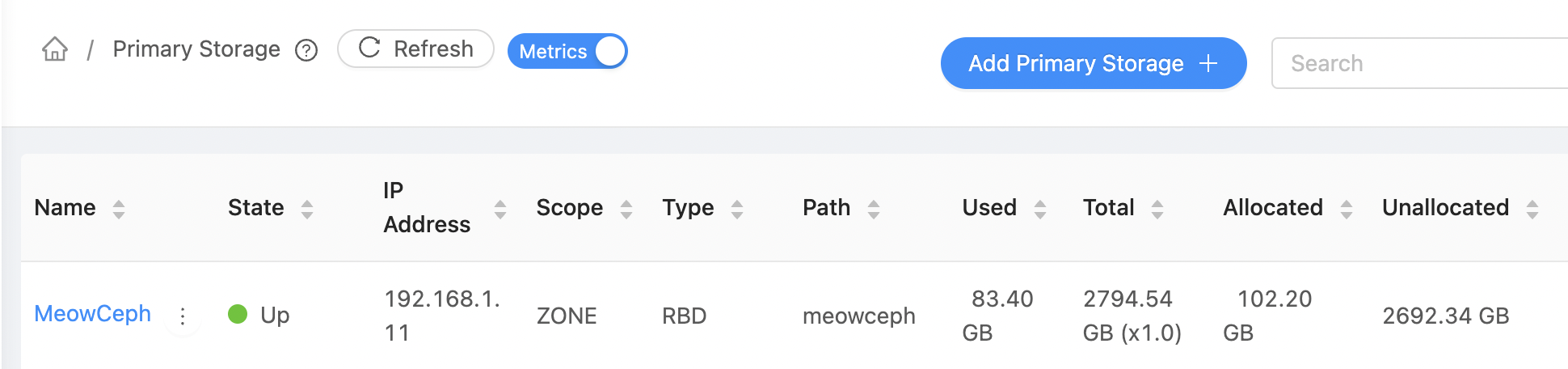
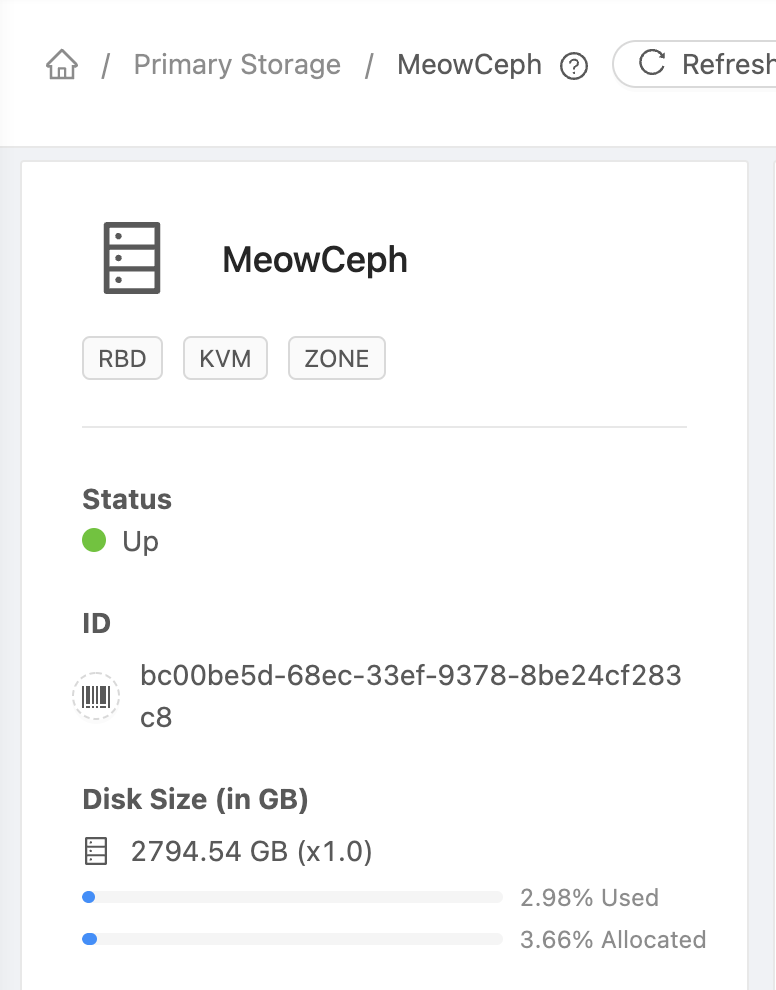
# ceph df
--- RAW STORAGE ---
CLASS     SIZE    AVAIL     USED  RAW USED  %RAW USED
ssd    2.7 TiB  1.6 TiB  1.2 TiB   1.2 TiB      42.85
TOTAL  2.7 TiB  1.6 TiB  1.2 TiB   1.2 TiB      42.85

--- POOLS ---
POOL                   ID  PGS   STORED  OBJECTS     USED  %USED  MAX AVAIL
device_health_metrics   1    1  2.0 MiB        1  5.9 MiB      0    486 GiB
meowceph                2   64   30 GiB    7.95k   83 GiB   5.41    486 GiB
...
cc @wido @GabrielBrascher @weizhouapache do you know/remember if the pool total/capacity in CloudStack relates to the raw capacity or the storable/stored capacity? Basically is this expected or we should fix the parsing to get stored capacity instead of used capacity from ceph.
Hi @rohityadavcloud ,
For example
Ceph Total Disk Capacity: 9 TiB
Replica set: 3
CloudStack Overprovisioning Factor: 2
CloudStack Disk Allocated: 2 TiB
CloudStack Disk Size Used: 1.8 TiB (with Replica is 5.4 TiB)
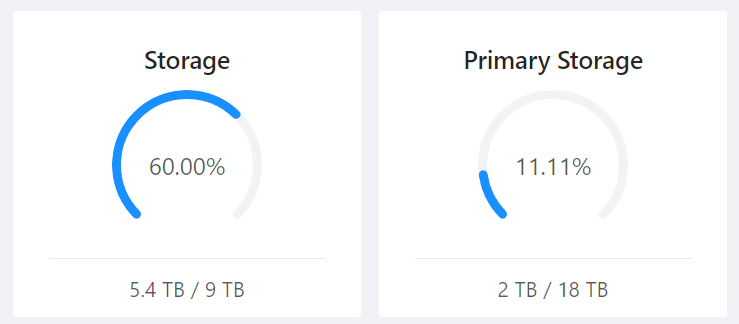
- Why Used 5.4 TB is over then Allocated 2TB?
It is weird. - Does it means VM can storage more 3.6 TB (9-5.4)?
No. Actually VM can just storage 1.2 TB. - Does it means Overprovisioning Factor is 2?
No. You can only storage 3 TB with Replica in 9 TB, the real Overprovisioning Factor is 18 TB / 3 TB = 6
Then I set Capacity Bytes to 3 TiB.
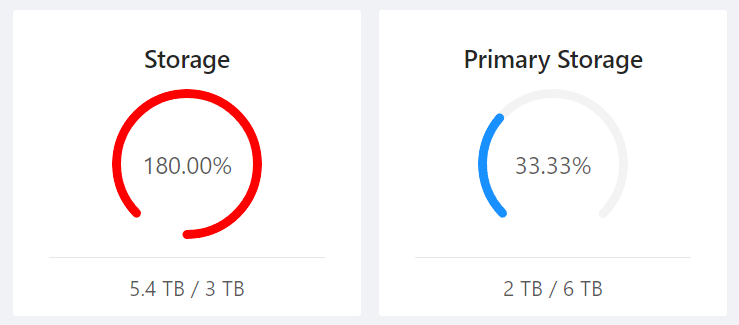
- Does it means used Disk Space is 180%?
No.
In my opinion,
Only shows how much CloudStack can use in CloudStack.
And the Disk and Replica show on Ceph Dashboard.- Why Used 5.4 TB is over then Allocated 2TB?
It is correct that CloudStack does not know how much data is being used inside Ceph.
CloudStack gets its information from libvirt, try running this on one of the hypervisors:
virsh pool-list
virsh pool-info
Ceph reports back:
- Total RAW capacity of Ceph
- Stored bytes on Ceph
CloudStack nor libvirt know if the replication size configured in Ceph is 2x, 3x, 4x, etc. Or it even is Erasure Coding.
Ceph also can't tell you how much data you can store in your cluster as it depends on the replication size for each pool.
Maybe we can improve things here, but this does depend on Libvirt giving the right information to CloudStack.
CloudStack gets its information from libvirt.
So, I think this should fix in libvirt.


ISSUE TYPE
COMPONENT NAME
CLOUDSTACK VERSION
CONFIGURATION
CEPH Primary Storage
OS / ENVIRONMENT
N/A
SUMMARY
CEPH Storage has Replica Size as 3.
Disk Total and Disk Size Used need Divide by CEPH Replica Size.
STEPS TO REPRODUCE
EXPECTED RESULTS
ACTUAL RESULTS