Repository navigation
Closing brace of if block is deindented if block contains a pipe #1236
Description
Activity
cc Christoph Bergmeister (@bergmeister) this might have been introduced by #1102
Another case where the pipe is inline and it affects any following statement (not just the closing brace):
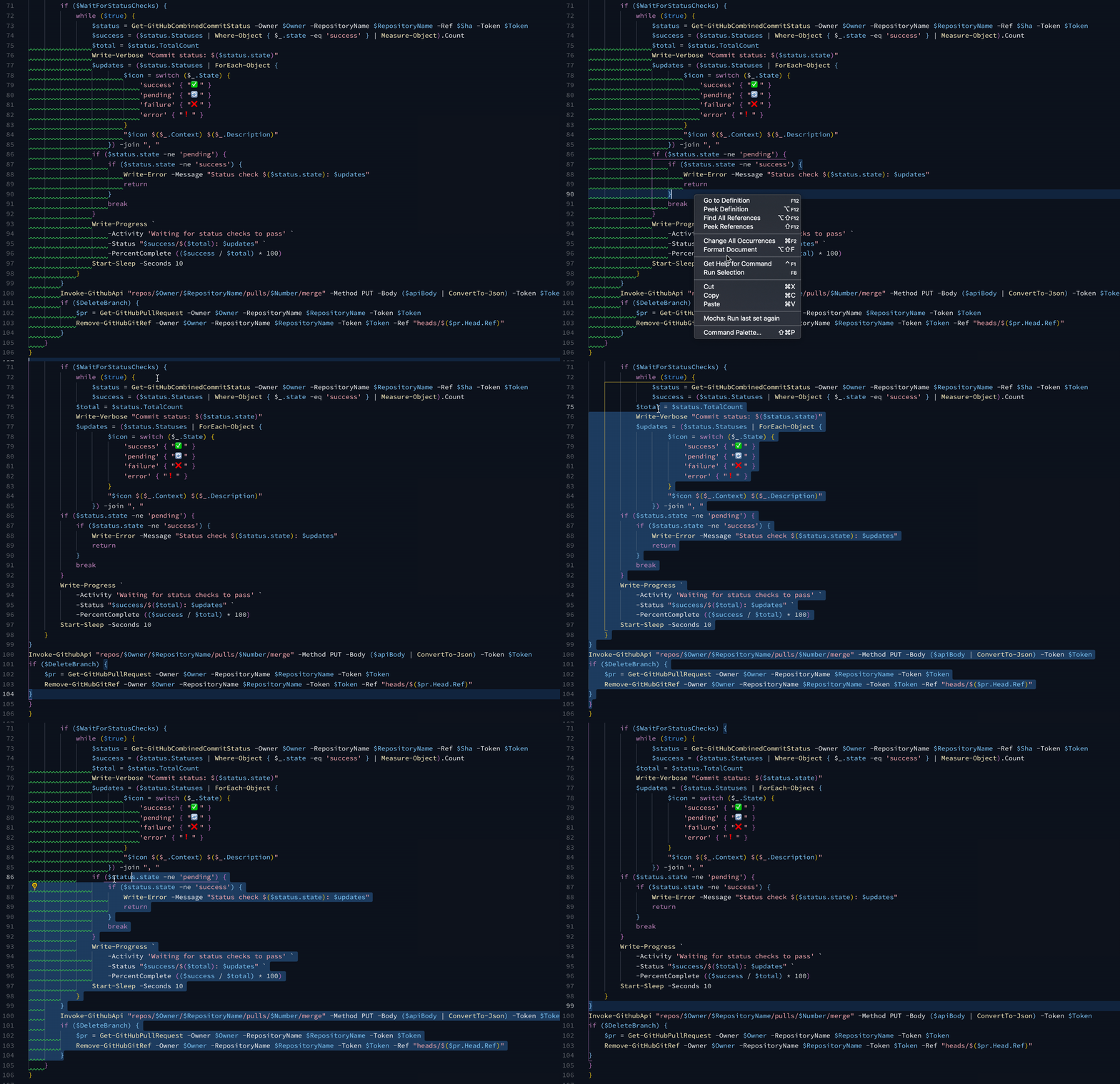
I just coincidentally found this too, but somehow ended up posting in the wrong repository:
$scriptDefinition = @'
if ($ifmResxContent.root.data.name -match $srecBlockNameMatch) {
$resxFile.FullName # indicate the file we're processing

# find each data block we believe we can process because it possesses an SREC file believed to be stored in Flash
foreach ($datablock in ($ifmResxContent.root.data | Where-Object name -Match $srecBlockNameMatch)) {
$orgDataLength = $datablock.value.Length
# convert reduced result back to Base64String
$datablock.value = ([Convert]::ToBase64String([Text.Encoding]::UTF8.GetBytes(
# convert from Base64String
[Text.Encoding]::UTF8.GetString([Convert]::FromBase64String($datablock.value)
# remove effectively empty S3, S2, or S1 DATA records
) -replace 'S(?:(?:3.{4})|(?:2..)|(?:1)).{6}(?:FF)+..\r*\n')
# take the new Base64String and break it into 80 character lines formatted as assumed for the RESX file
) -replace '.{1,80}', "`n        `$&") + "`n"
"...Reduced block '$($datablock.name)' by $($orgDataLength - $datablock.value.Length) bytes."
}

# put the file back out with XMLWriter, as PowerShell seems to lack integral XML object output support.
$xmlWriter = [Xml.XmlWriter]::Create("$($resxFile.DirectoryName)\$($resxFile.BaseName) Reduced.resx", $xmlSettings)
try {
$ifmResxContent.Save($xmlWriter)
}
finally {
$xmlWriter.Dispose()
}
# generate the hash file for the rebuilt RESX file
Set-Content "$($resxFile.DirectoryName)\$($resxFile.BaseName) Reduced.md5" (Get-FileHash "$($resxFile.DirectoryName)\$($resxFile.BaseName) Reduced.resx" -Algorithm MD5).hash.ToLowerInvariant()
}
'@

Invoke-Formatter -ScriptDefinition $scriptDefinition
if I format just the foreach block by itself in Invoke-Formatter, its fine, but in VS Code the second line fails to indent, throwing everything else after it off, or if I include the prior IF statement, it fails, same thing.
if ($ifmResxContent.root.data.name -match $srecBlockNameMatch) {
    $resxFile.FullName # indicate the file we're processing

    # find each data block we believe we can process because it possesses an SREC file believed to be stored in Flash
    foreach ($datablock in ($ifmResxContent.root.data | Where-Object name -Match $srecBlockNameMatch)) {
    $orgDataLength = $datablock.value.Length
    # convert reduced result back to Base64String
    $datablock.value = ([Convert]::ToBase64String([Text.Encoding]::UTF8.GetBytes(
                # convert from Base64String
                [Text.Encoding]::UTF8.GetString([Convert]::FromBase64String($datablock.value)
                    # remove effectively empty S3, S2, or S1 DATA records
                ) -replace 'S(?:(?:3.{4})|(?:2..)|(?:1)).{6}(?:FF)+..\r*\n')
            # take the new Base64String and break it into 80 character lines formatted as assumed for the RESX file
        ) -replace '.{1,80}', "`n        `$&") + "`n"
    "...Reduced block '$($datablock.name)' by $($orgDataLength - $datablock.value.Length) bytes."
}

# put the file back out with XMLWriter, as PowerShell seems to lack integral XML object output support.
$xmlWriter = [Xml.XmlWriter]::Create("$($resxFile.DirectoryName)\$($resxFile.BaseName) Reduced.resx", $xmlSettings)
try {
    $ifmResxContent.Save($xmlWriter)
}
finally {
    $xmlWriter.Dispose()
}
# generate the hash file for the rebuilt RESX file
Set-Content "$($resxFile.DirectoryName)\$($resxFile.BaseName) Reduced.md5" (Get-FileHash "$($resxFile.DirectoryName)\$($resxFile.BaseName) Reduced.resx" -Algorithm MD5).hash.ToLowerInvariant()
}
It has to do with pipe in the argument of the foreach statement. The pipe is IN the value argument, and the argument closes before the end of the line, so no indenting should apply to this pipe instance. If I change the indent setting for pipes back to 'none', it formats correct. However, I prefer continued lines to be indented (and not just when continued by pipe).
Christoph Bergmeister (@bergmeister) this was supposedly fixed in 1.18.1 but it is still happening unfortunately
Thanks for bringing this up again, I thought PR #1191 that fixed a very similar issue had fixed this but I clearly forgot to come back to this issue and test it as well. Can you confirm that the issue is not present if the pipelineindentation setting in vs code is set to NoIndentation (its default)?
1.18.1 seems to have fixed this for me. I had to update-module and then restart the session in order to get it.
If you run
Invoke-ScriptAnalyzer -Fix(1.18.1) on this file, the brace following the pipeline is deindented wrong:@@ -30,5 +30,5 @@ function Get-GitHubAssignee { $_.PSTypeNames.Insert(0, 'PSGitHub.User') $_ } - } +} }
> get-module PSScriptAnalyzer

ModuleType Version    Name                                ExportedCommands
---------- -------    ----                                ----------------
Script     1.18.1     PSScriptAnalyzer                    {Get-ScriptAnalyzerRule, Invoke-Formatter, Invoke-ScriptAnalyzer}
Felix Becker (@felixfbecker) I cannot reproduce your last example. Are you using a custom PSSA settings file? I can reproduce using
Invoke-Formatterthough and in VS Code with thepowershell.codeFormatting.pipelineIndentationStyleset to any value other than its default ofNoIndentation, I suggest you do not change the default value of this VS Code setting for now and apply the same to the equivalent configuration setting of thePSUseConsistentIndentationrule in the PSSA settings file (in PSSA the default for it isIncreaseIndentationForFirstPipelinethough, maybe we should've defaulted toNoIndentationhere as well)Yes, I am using
PipelineIndentation = 'IncreaseIndentationForFirstPipeline'again because I was under the impression that this was supposed to be fixed with 1.18.1NoIndentationis unreadable and would cause a big diff. The only alternative is to disable the rule for now and format manually which is a bummer.Hmm, yes, I agree it is a bummer that there's still cases like this that are not fixed in
1.18.1and apologize for that, it is hard to keep track of all the incoming issues.
In retrospective, maybe having a 4th setting to just ignore pipeline statements would've been better so that one does not have to turn off the rule completely or useNoIndentationI think the main part of pipes are fixed, but this particular line (the continuation line shown here) should be indented twice!
        Invoke-GitHubApi "/repos/$Owner/$RepositoryName/assignees" -Token $Token | ForEach-Object { $_ } | ForEach-Object {
            $_.PSTypeNames.Insert(0, 'PSGitHub.User')
        }
Once for the pipe, once again for the open brace of the script-block being passed to
Foreach-Object.Invoke-GitHubApi "/repos/$Owner/$RepositoryName/assignees" -Token $Token | ForEach-Object { $_ } | ForEach-Object { $_.PSTypeNames.Insert(0, 'PSGitHub.User') }
No, imo if it was opened on the same line, it should not indent (i.e. your first code block is the expected output).
But the problem here is not that, it's that the brace after that is deindented.
Total indention is total indention. At the beginning of the second line, there are now TWO statements active, therefore there should be two indentions.
If continued lines are to be indented, then the closing brace of the scriptblock passed to the final foreach-object must be indented because it is NOT yet the close of that line. If it was not indented, it would represent a new line, to which it is not, as I can continue to specify parameters for the original foreach-object command.
A different demonstration:
Invoke-GitHubApi "/repos/$Owner/$RepositoryName/assignees" -Token $Token | ForEach-Object { $_ } | ForEach-Object { $_.PSTypeNames.Insert(0, 'PSGitHub.User') } -End { $input } -Debug # this is the next statement
Why is this different than other blocks such as a 'for' or 'foreach' or even 'function'? For those, the closing brace is literally the end of the statement, and another fully independent statement can start on the same line.
This aside, I do see where the error here is coming from. The option "increaseIndentionForFIRSTpipeline" only increases for the FIRST but only if its also the end of the line. It should probably be something like "ForLastPipeline".
Long term I would actually like to see this option expanded to properly indent ALL continued lines regardless if it was a pipe (operator) or a regular operator or a backtick that caused the continuation, and this would be separate from any braces, brackets, or parenthesis which would cause additional indention.
Ok, I now have 2 more simplified examples that shows that is seems to be a problem that starts only after the 3rd layer.
Invoke-Something | ForEach-Object {
	Invoke-Something | ForEach-Object {
		Invoke-Something | ForEach-Object {
		}
	}
}
function foo {
	function bar {
		Invoke-Something | ForEach-Object {
		}
	}
}
Especially the last example shows tat the 'problem' is the newline after
ForEach-Object {, i.e. changing it toForEach-Object { }makes it not appear. I need to thoroughly debug this and have a deep think. I will see if I can come up with a solution.To summarize the status of the issue and its comments:
- The example given originally in this issue comment here originally got fixed in 1.18.1
- The recent example here that was posted after the release of 1.18.1 will be fixed by PR Fix edge case when PipelineIndentationStyle is not set to NoIndentation #1261 . It was a problem that if a multi-line statement follows a pipelines that are on one line, it was incorrectly seen as a multi-line pipeline
- The question about total indentation here is present in 1.18.1 and the PR that I opened does not address it. I am not sure if most people agree with using total indentation so that should maybe be a new configurable setting. I suggest to open a separate issue.
Please find below a patched version of PSSA 1.18.1 (locally built, so no signing) with the new fix in PR 1261. If you replace this with the local PSSA installation (make sure you install it separately before using Install-Module), then VS Code will start picking it up automatically (instead of using the version that ships with the PowerShell extension)
PSScriptAnalyzer.zipI believe use case I have follows with this, and appears a fix is already in master for planned release...but just want to make sure. I'm a maintainer for dbatools and working on getting us updated to use 1.18.1 release (Which happily is finding formatting issues that we were not catching before 😁 )
Anyway, our `Backup-DbaDatabase command has this code format currently:
                            if ($Verify) {
                                $verifiedresult = [PSCustomObject]@{
                                    ComputerName         = $server.ComputerName
                                    InstanceName         = $server.ServiceName
                                    SqlInstance          = $server.DomainInstanceName
                                    DatabaseName         = $dbname
                                    BackupComplete       = $BackupComplete
                                    BackupFilesCount     = $FinalBackupPath.Count
                                    BackupFile           = (Split-Path $FinalBackupPath -Leaf)
                                    BackupFolder         = (Split-Path $FinalBackupPath | Sort-Object -Unique)
                                    BackupPath           = ($FinalBackupPath | Sort-Object -Unique)
                                    Script               = $script
                                    Notes                = $failures -join (',')
                                    FullName             = ($FinalBackupPath | Sort-Object -Unique)
                                    FileList             = $FileList
                                    SoftwareVersionMajor = $server.VersionMajor
                                    Type                 = $outputType
                                    FirstLsn             = $HeaderInfo.FirstLsn
                                    DatabaseBackupLsn    = $HeaderInfo.DatabaseBackupLsn
                                    CheckPointLsn        = $HeaderInfo.CheckPointLsn
                                    LastLsn              = $HeaderInfo.LastLsn
                                    BackupSetId          = $HeaderInfo.BackupSetId
                                    LastRecoveryForkGUID = $HeaderInfo.LastRecoveryForkGUID
                                } | Restore-DbaDatabase -SqlInstance $server -DatabaseName DbaVerifyOnly -VerifyOnly -TrustDbBackupHistory -DestinationFilePrefix DbaVerifyOnly
                                if ($verifiedResult[0] -eq "Verify successful") {
                                    $failures += $verifiedResult[0]
                                    $Verified = $true
                                } else {
                                    $failures += $verifiedResult[0]
                                    $Verified = $false
                                }
                            }
                            $HeaderInfo | Add-Member -Type NoteProperty -Name BackupComplete -Value $BackupComplete
                            $HeaderInfo | Add-Member -Type NoteProperty -Name BackupFile -Value (Split-Path $FinalBackupPath -Leaf)
                            $HeaderInfo | Add-Member -Type NoteProperty -Name BackupFilesCount -Value $FinalBackupPath.Count
                            if ($FinalBackupPath[0] -eq 'NUL:') {
                                $pathresult = "NUL:"
                            } else {
``1

PSUseConsistentIndentation is flagging every line from 603 down to EOF. If I adjust the PSCustomObject to a variable and then pipe that variable into the command on line 601 it clears up the the rule flagging.

Will this be addressed as well in the PR from master? (If I need to create a new issue just let me know.)


Before submitting a bug report:
Steps to reproduce
Expected behavior
This should be the expected formatting and not a rule violation:
Actual behavior
The above is marked as a rule violation of PSUseConsistentIndentation, and it is autocorrected to this:
This does not happen if you remove the
| f.If the block contains further nested
ifblocks, all following closing braces are also off by one indentation to the left.Environment data